> ## Documentation Index
> Fetch the complete documentation index at: https://docs.talentunveiled.com/llms.txt
> Use this file to discover all available pages before exploring further.
# API Reference
> Integrate with TalentUnveiled using our REST API
# API Reference
The TalentUnveiled API is a RESTful API that allows you to programmatically manage jobs, candidates, interviews, and evaluations.
## Base URL
```
https://api.talentunveiled.com/api/v1
```
## Authentication
All API requests require an API key. Include your API key in the `Authorization` header.
In the sidebar, open **Settings → Developer** (visible to organization admins) and find the **API Keys** section.
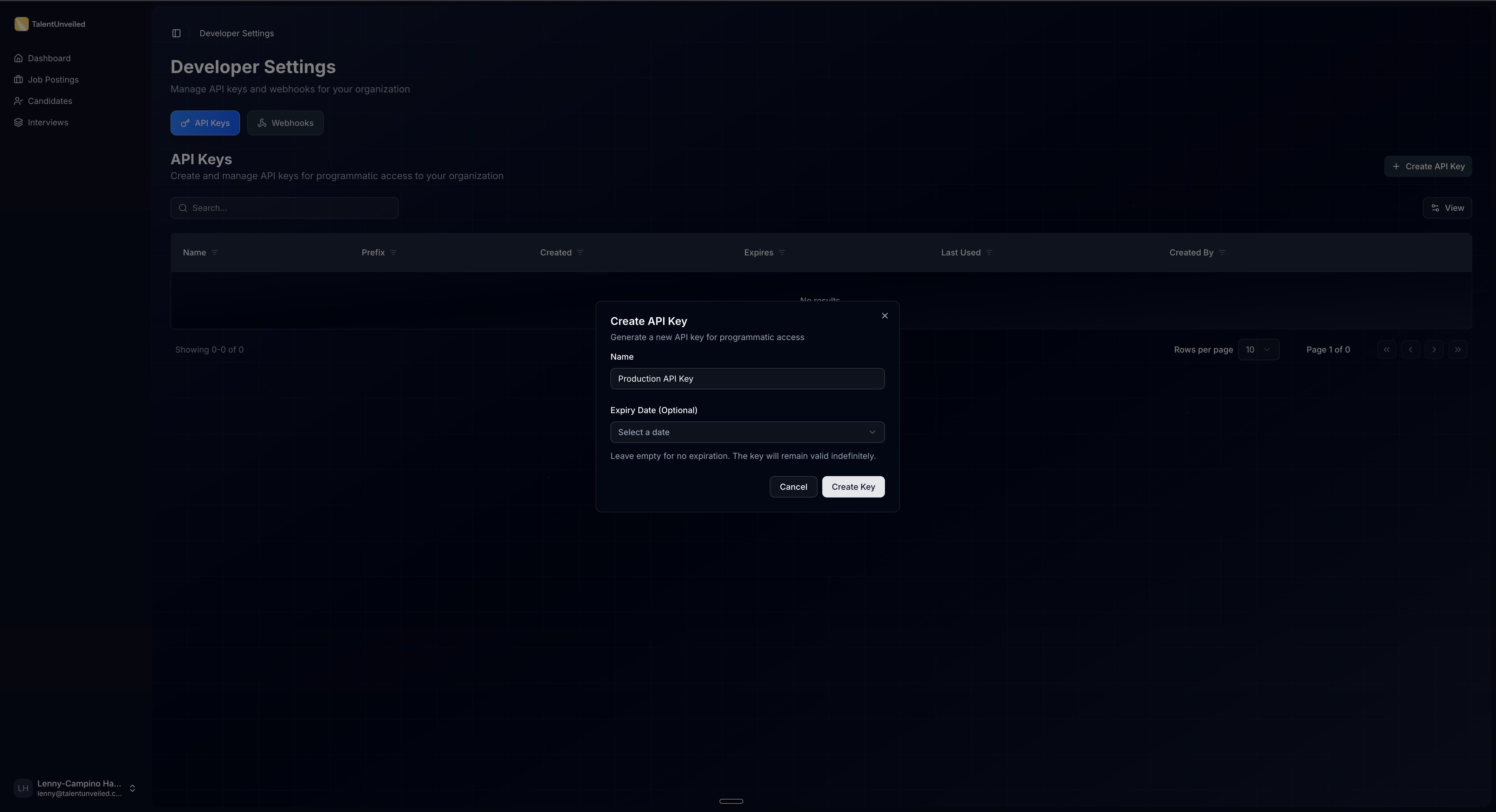
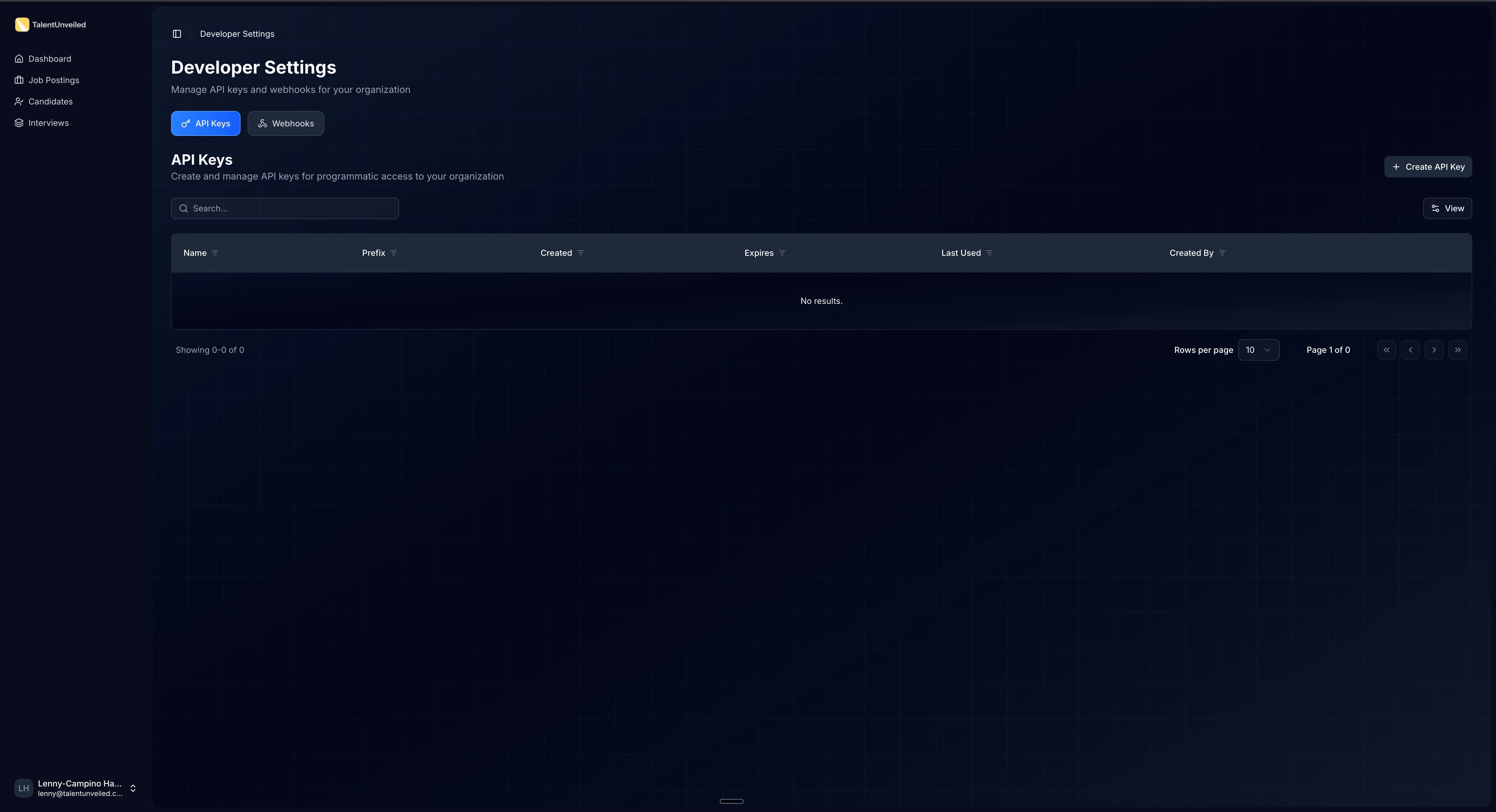 Click **Create API Key**. Enter a **Name** (e.g., "Production API Key") and an optional **Expiry Date**, then click **Create**.
 The full key is displayed once and auto-copied to your clipboard. It follows the format `sk-xxxxx.xxxxxxxxxxxxxxxxxxxxxxxxxxxxxxxx`.
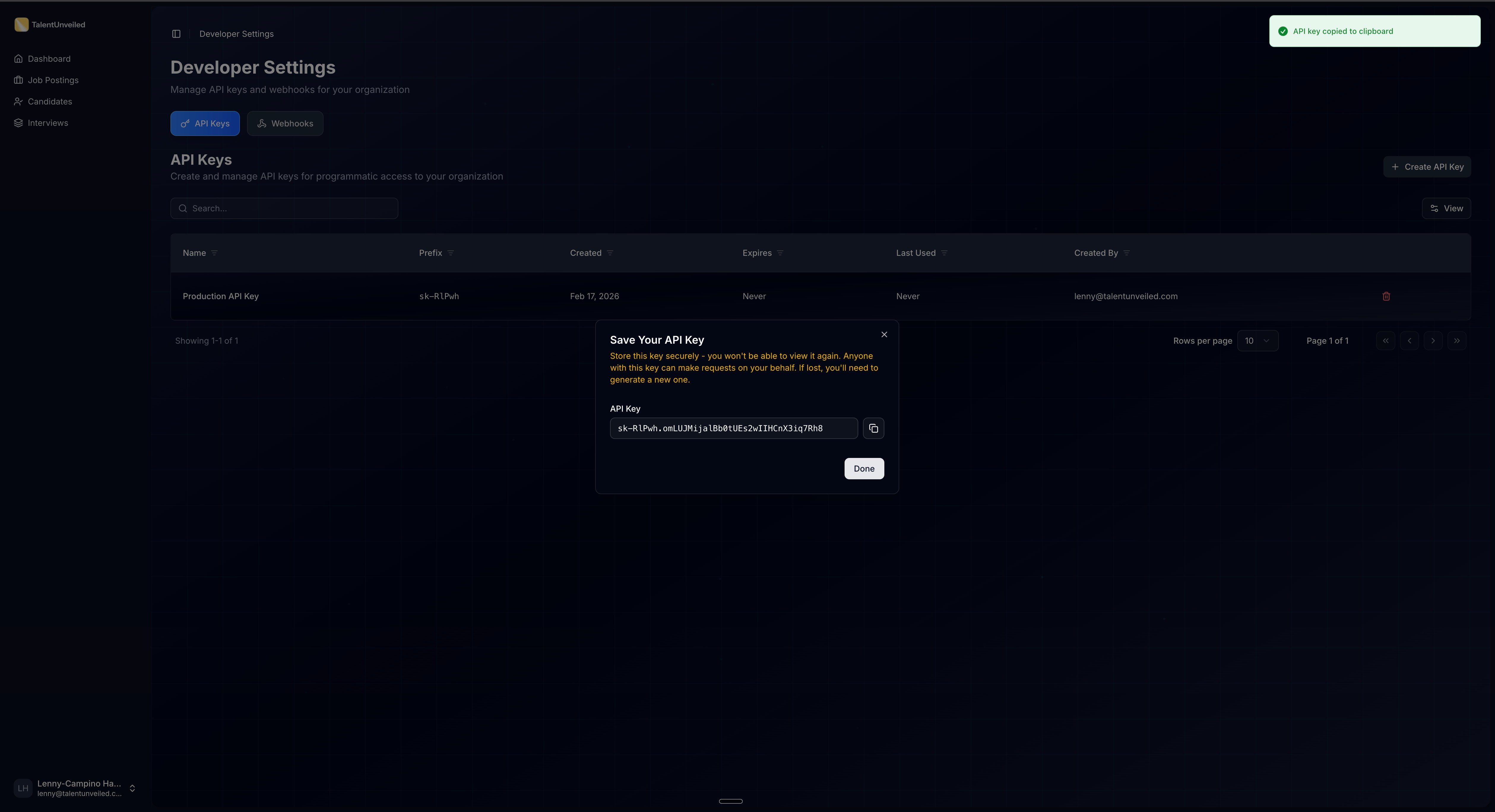 The API key is only shown once. Store it in a secure location immediately — you cannot retrieve it later. If you lose it, delete the key and create a new one.
Include the key in the `Authorization` header:
```bash cURL theme={null}
curl -H "Authorization: Bearer " \
https://api.talentunveiled.com/api/v1/jobs/
```
```python Python theme={null}
import requests
headers = {"Authorization": "Bearer "}
response = requests.get("https://api.talentunveiled.com/api/v1/jobs/", headers=headers)
```
```javascript JavaScript theme={null}
const response = await fetch("https://api.talentunveiled.com/api/v1/jobs/", {
headers: { Authorization: "Bearer " },
});
```
Keep your API keys secure. Do not share them in public repositories or client-side code.
## Error Response Format
All error responses return a JSON array of error objects. Each object contains:
Machine-readable error code from a fixed set of values.
Human-readable error message describing what went wrong.
The field name that caused the error. `null` for non-field errors.
**Validation error example:**
```json theme={null}
[
{
"code": "required",
"detail": "This field is required.",
"attr": "email"
},
{
"code": "invalid_input",
"detail": "Enter a valid URL.",
"attr": "website"
}
]
```
**Authentication error example:**
```json theme={null}
[
{
"code": "not_authenticated",
"detail": "Authentication credentials were not provided.",
"attr": null
}
]
```
## Common Error Codes
| Code | Description |
| ----------------------- | ------------------------------------------ |
| `error` | Generic server error |
| `invalid_input` | Validation failed on the provided input |
| `parse_error` | Malformed request body (invalid JSON) |
| `authentication_failed` | Invalid API key |
| `not_authenticated` | Missing `Authorization` header |
| `permission_denied` | Valid key but insufficient permissions |
| `not_found` | Resource does not exist |
| `method_not_allowed` | HTTP method not supported on this endpoint |
| `required` | A required field was not provided |
| `does_not_exist` | A referenced related object was not found |
| `invalid_file_type` | Uploaded file type is not supported |
| `file_too_large` | Uploaded file exceeds the size limit |
## HTTP Status Codes
| Status Code | Description |
| ----------- | -------------------------------------------------------- |
| `200` | Success |
| `201` | Resource created |
| `204` | Success with no response body |
| `400` | Bad request — check the error response for details |
| `401` | Unauthorized — invalid or missing API key |
| `403` | Forbidden — insufficient permissions |
| `404` | Not found — the resource doesn't exist |
| `413` | Payload too large — uploaded file exceeds the size limit |
| `500` | Server error — contact support |
## Pagination
List endpoints return paginated results using `limit` and `offset` query parameters.
Maximum number of results to return per page.
Number of results to skip before returning.
```bash theme={null}
GET /api/v1/jobs/?limit=20&offset=40
```
Paginated responses include metadata for navigating through results:
```json theme={null}
{
"count": 42,
"next": "https://api.talentunveiled.com/api/v1/jobs/?limit=20&offset=20",
"previous": null,
"results": [...]
}
```
| Field | Description |
| ---------- | --------------------------------------------------------- |
| `count` | Total number of results across all pages |
| `next` | URL for the next page, or `null` if on the last page |
| `previous` | URL for the previous page, or `null` if on the first page |
| `results` | Array of resource objects for the current page |
## Explore the API
Browse the auto-generated API reference below, built from our OpenAPI specification. Each endpoint includes request/response examples and parameter descriptions.
The API key is only shown once. Store it in a secure location immediately — you cannot retrieve it later. If you lose it, delete the key and create a new one.
Include the key in the `Authorization` header:
```bash cURL theme={null}
curl -H "Authorization: Bearer " \
https://api.talentunveiled.com/api/v1/jobs/
```
```python Python theme={null}
import requests
headers = {"Authorization": "Bearer "}
response = requests.get("https://api.talentunveiled.com/api/v1/jobs/", headers=headers)
```
```javascript JavaScript theme={null}
const response = await fetch("https://api.talentunveiled.com/api/v1/jobs/", {
headers: { Authorization: "Bearer " },
});
```
Keep your API keys secure. Do not share them in public repositories or client-side code.
## Error Response Format
All error responses return a JSON array of error objects. Each object contains:
Machine-readable error code from a fixed set of values.
Human-readable error message describing what went wrong.
The field name that caused the error. `null` for non-field errors.
**Validation error example:**
```json theme={null}
[
{
"code": "required",
"detail": "This field is required.",
"attr": "email"
},
{
"code": "invalid_input",
"detail": "Enter a valid URL.",
"attr": "website"
}
]
```
**Authentication error example:**
```json theme={null}
[
{
"code": "not_authenticated",
"detail": "Authentication credentials were not provided.",
"attr": null
}
]
```
## Common Error Codes
| Code | Description |
| ----------------------- | ------------------------------------------ |
| `error` | Generic server error |
| `invalid_input` | Validation failed on the provided input |
| `parse_error` | Malformed request body (invalid JSON) |
| `authentication_failed` | Invalid API key |
| `not_authenticated` | Missing `Authorization` header |
| `permission_denied` | Valid key but insufficient permissions |
| `not_found` | Resource does not exist |
| `method_not_allowed` | HTTP method not supported on this endpoint |
| `required` | A required field was not provided |
| `does_not_exist` | A referenced related object was not found |
| `invalid_file_type` | Uploaded file type is not supported |
| `file_too_large` | Uploaded file exceeds the size limit |
## HTTP Status Codes
| Status Code | Description |
| ----------- | -------------------------------------------------------- |
| `200` | Success |
| `201` | Resource created |
| `204` | Success with no response body |
| `400` | Bad request — check the error response for details |
| `401` | Unauthorized — invalid or missing API key |
| `403` | Forbidden — insufficient permissions |
| `404` | Not found — the resource doesn't exist |
| `413` | Payload too large — uploaded file exceeds the size limit |
| `500` | Server error — contact support |
## Pagination
List endpoints return paginated results using `limit` and `offset` query parameters.
Maximum number of results to return per page.
Number of results to skip before returning.
```bash theme={null}
GET /api/v1/jobs/?limit=20&offset=40
```
Paginated responses include metadata for navigating through results:
```json theme={null}
{
"count": 42,
"next": "https://api.talentunveiled.com/api/v1/jobs/?limit=20&offset=20",
"previous": null,
"results": [...]
}
```
| Field | Description |
| ---------- | --------------------------------------------------------- |
| `count` | Total number of results across all pages |
| `next` | URL for the next page, or `null` if on the last page |
| `previous` | URL for the previous page, or `null` if on the first page |
| `results` | Array of resource objects for the current page |
## Explore the API
Browse the auto-generated API reference below, built from our OpenAPI specification. Each endpoint includes request/response examples and parameter descriptions.