> ## Documentation Index
> Fetch the complete documentation index at: https://docs.talentunveiled.com/llms.txt
> Use this file to discover all available pages before exploring further.
# Webhooks
> Receive real-time notifications when events occur in TalentUnveiled
TalentUnveiled sends HTTP POST requests to your configured endpoint URL whenever events occur in the platform. Use webhooks to keep your systems in sync — for example, to update your ATS when a candidate completes an interview.
## Enable Webhooks
In the [HR portal](https://hr.talentunveiled.com), open the sidebar and navigate to **Developer Settings**, then select the **Webhooks** tab.
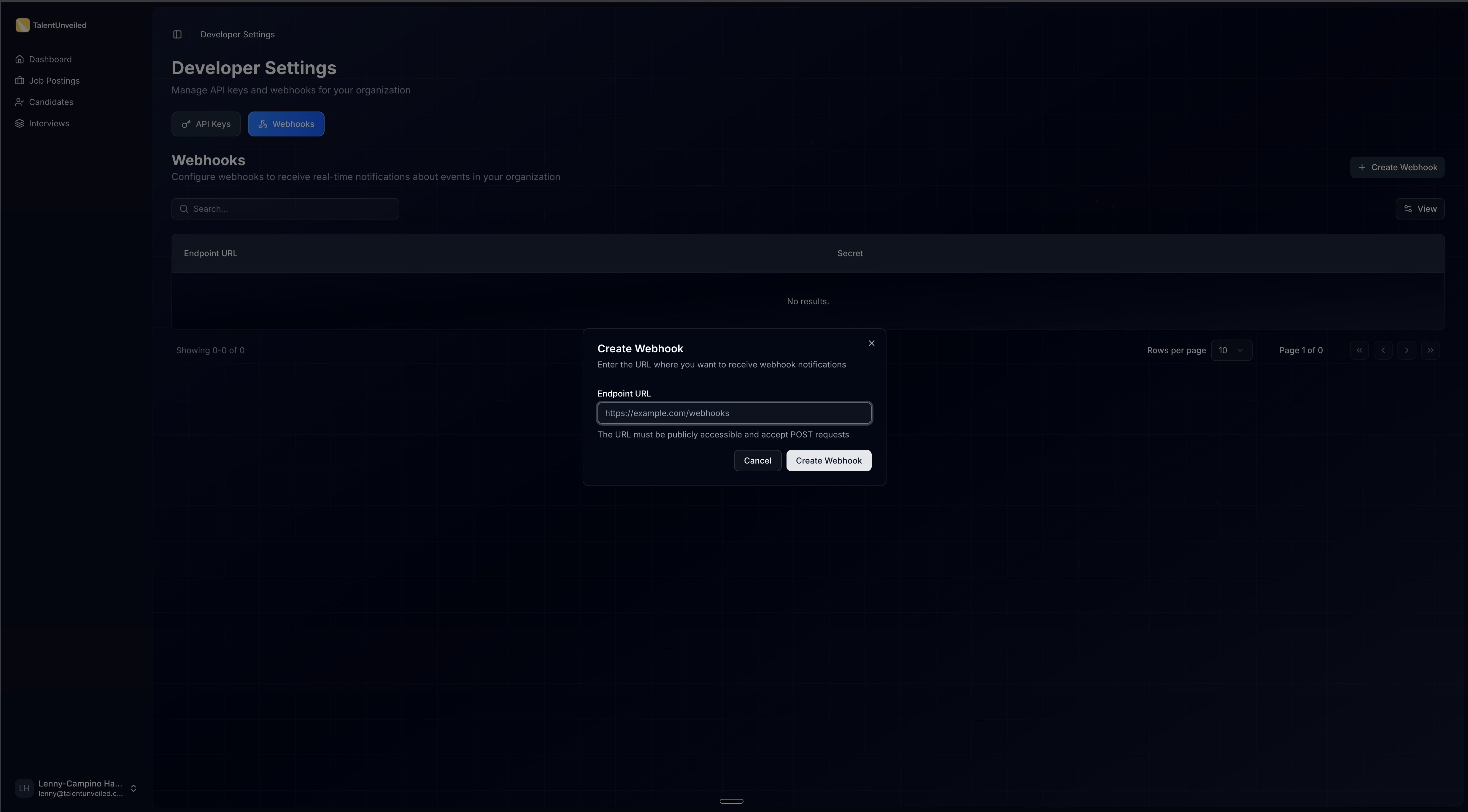
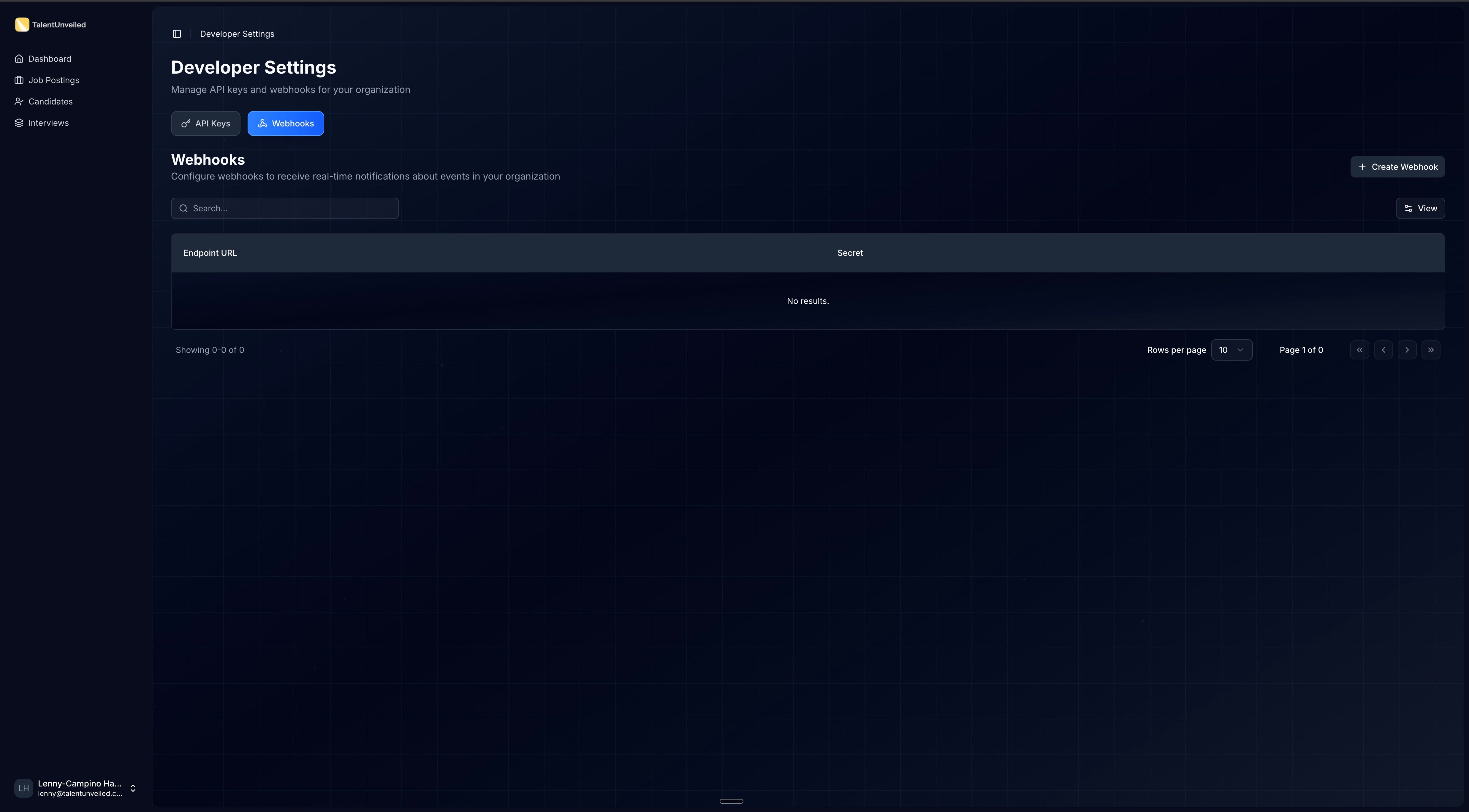 Click **Create Webhook**. In the dialog that appears, enter your **Endpoint URL** (e.g., `https://your-app.com/webhooks`) and confirm.
 After creation, a dialog displays your signing secret (prefixed with `whsec_`). It is automatically copied to your clipboard. You'll use this to [verify webhook signatures](#verifying-signatures).
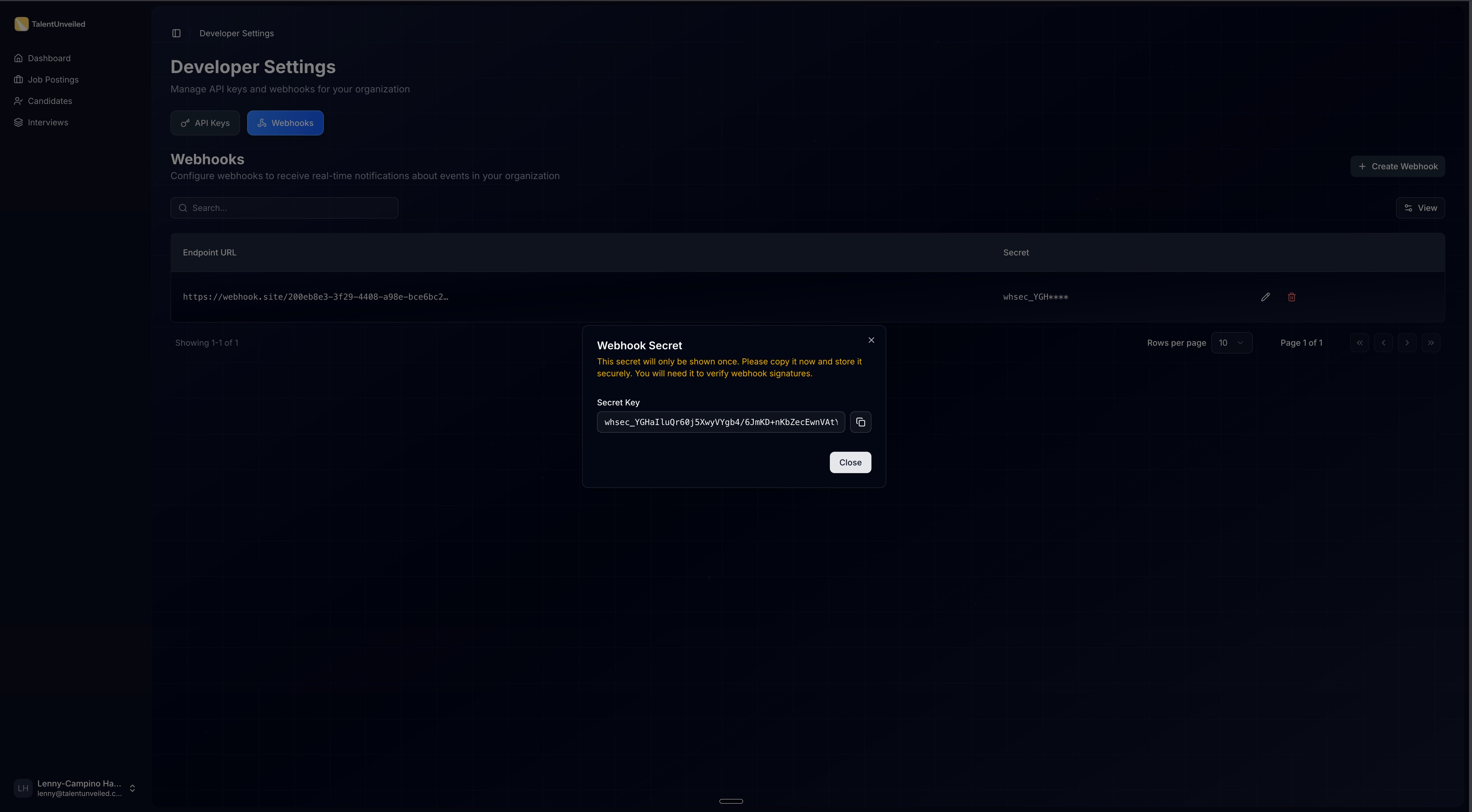 The signing secret is only shown once. Store it in a secure location immediately — you cannot retrieve it later. If you lose it, delete the webhook and create a new one from the **Webhooks** page in [Developer Settings](https://hr.talentunveiled.com).
Once your endpoint is registered, TalentUnveiled will send HTTP POST requests to your URL whenever subscribed events occur. Your endpoint should return a `2xx` status code to acknowledge receipt.
## Available Webhooks
All webhook payloads share this envelope structure:
```json theme={null}
{
"event_type": "interview.completed",
"webhook_id": "550e8400-e29b-41d4-a716-446655440000",
"payload": {}
}
```
Each request includes the following headers:
| Header | Description |
| ------------------- | -------------------------------------------- |
| `Content-Type` | `application/json` |
| `webhook-id` | Unique message ID (e.g., `msg_a1b2c3...`) |
| `webhook-timestamp` | Unix timestamp in seconds |
| `webhook-signature` | HMAC-SHA256 signature (e.g., `v1,base64...`) |
Every endpoint you register receives **all** event types. Branch on the `event_type` field and ignore
the events you don't handle.
### `job_application.deleted`
Fired when an HR portal user deletes a job application. The payload
is a snapshot of the application captured immediately before the record is
removed. Treat this as the definitive "record is gone" signal — any associated interview, CV evaluation,
and insights data are removed along with the application.
```json theme={null}
{
"event_type": "job_application.deleted",
"webhook_id": "c8c7a51a-2b14-4b4a-8a1d-5e2f5b2f1c90",
"payload": {
"id": "a3bd0538-ac3f-458d-bbb1-78699575c73e",
"status": "shortlisted",
"created_at": "2026-02-05T09:01:34.496706Z",
"candidate": {
"first_name": "Michael",
"last_name": "Johnson",
"phone_number": "+14155551002",
"email": "michael.johnson@candidate.example.com"
},
"job": {
"id": "e7211749-3b99-4ce4-8317-aca38e595b14",
"title": "Product Manager"
}
}
}
```
| Field | Description |
| -------------------- | ----------------------------------------------------------------------------------------------------------- |
| `payload.id` | The deleted application's ID. Use this to locate and remove the matching record on your side. |
| `payload.status` | The application's status at the moment of deletion (e.g. `applied`, `shortlisted`, `interviewed`, `hired`). |
| `payload.created_at` | When the application was originally created. |
| `payload.candidate` | Contact details for the candidate. |
| `payload.job` | The job posting the application belonged to. |
### `interview.completed`
Fired when a candidate's AI interview finishes and scores are ready. The payload carries enough to triage
(score, eligibility, a short summary, strengths/weaknesses/red flags) without a follow-up call. For the full
transcript, per-criteria scores, and per-question detail, fetch the interview by `payload.interview.id` via
the API.
```json theme={null}
{
"event_type": "interview.completed",
"webhook_id": "a487d264-8a33-4a07-9f54-6a9be6950aa9",
"payload": {
"application": {
"id": "a3bd0538-ac3f-458d-bbb1-78699575c73e",
"status": "interviewed",
"created_at": "2026-02-05T09:01:34.496706Z"
},
"candidate": {
"first_name": "Michael",
"last_name": "Johnson",
"phone_number": "+14155551002",
"email": "michael.johnson@candidate.example.com"
},
"job": {
"id": "e7211749-3b99-4ce4-8317-aca38e595b14",
"title": "Product Manager"
},
"interview": {
"id": "7c9e6679-7425-40de-944b-e07fc1f90ae7",
"completed_at": "2026-02-05T09:15:20.123456+00:00",
"result": {
"overall_score": 4.2,
"is_eligible": true,
"summary": "Strong product sense and clear communication; led two 0-to-1 launches.",
"strengths": ["Structured prioritization", "Clear communicator"],
"weaknesses": ["Limited experience with marketplace pricing"],
"red_flags": []
}
}
}
}
```
| Field | Description |
| ---------------------------------------- | ----------------------------------------------------------------------------------------------------------------- |
| `payload.application` | The job application, including its current pipeline status |
| `payload.candidate` | Contact details for the candidate |
| `payload.job` | The job posting the candidate interviewed for |
| `payload.interview.id` | The interview's ID. Use it to fetch the full transcript, per-criteria scores, and per-question detail via the API |
| `payload.interview.completed_at` | When the interview finished (`null` if no call time is recorded) |
| `payload.interview.result.overall_score` | Overall score on a 1-5 scale, or `null` for qualifications-only interviews |
| `payload.interview.result.is_eligible` | `false` when the candidate failed a required criterion |
| `payload.interview.result.summary` | One-paragraph summary of the candidate's performance |
| `payload.interview.result.strengths` | Key strengths from the AI evaluation (may be empty) |
| `payload.interview.result.weaknesses` | Areas for improvement from the AI evaluation (may be empty) |
| `payload.interview.result.red_flags` | Concerns surfaced during the interview (may be empty) |
### `interview_v2.completed`
Fired when a candidate's interview finishes on the v2 (legacy) interview pipeline. Unlike
`interview.completed`, this is a lightweight notification: it carries identifiers plus the candidate and
job, but no scores. Fetch the score, transcript, and per-criteria detail via the API using
`payload.interview_call_id`.
Knocked-out candidates also produce this event with `status: "completed"` — there is no separate
`knocked_out` status. Whether the candidate passed or was knocked out is only derivable via the API.
```json theme={null}
{
"event_type": "interview_v2.completed",
"webhook_id": "a487d264-8a33-4a07-9f54-6a9be6950aa9",
"payload": {
"interview_call_id": "7c9e6679-7425-40de-944b-e07fc1f90ae7",
"job_application_id": "a3bd0538-ac3f-458d-bbb1-78699575c73e",
"status": "completed",
"completed_at": "2026-02-05T09:15:20.123456+00:00",
"candidate": {
"first_name": "Michael",
"last_name": "Johnson",
"phone_number": "+14155551002",
"email": "michael.johnson@candidate.example.com"
},
"job": {
"id": "e7211749-3b99-4ce4-8317-aca38e595b14",
"title": "Product Manager"
}
}
}
```
| Field | Description |
| ---------------------------- | ---------------------------------------------------------------------------------------------- |
| `payload.interview_call_id` | The interview's ID. Use it to fetch the score, transcript, and per-criteria detail via the API |
| `payload.job_application_id` | The job application this interview belonged to |
| `payload.status` | The interview call's terminal status (`completed`) |
| `payload.completed_at` | When the interview finished |
| `payload.candidate` | Contact details for the candidate |
| `payload.job` | The job posting the candidate interviewed for |
## Verifying Signatures
Always verify webhook signatures before processing a payload. This ensures the request was sent by TalentUnveiled
and hasn't been tampered with.
The signature is computed over a specific message string using HMAC-SHA256:
1. Extract the `webhook-id`, `webhook-timestamp`, and `webhook-signature` headers from the request.
2. Concatenate the signed content: `{webhook-id}.{webhook-timestamp}.{body}`
3. Compute the HMAC-SHA256 hash using your base64-decoded signing secret.
4. Compare the result against the signature header using a constant-time comparison function.
```python Python theme={null}
import base64
import hashlib
import hmac
def verify_signature(secret: str, headers: dict, payload: str) -> bool:
"""Verify the webhook signature using constant-time comparison."""
if secret.startswith("whsec_"):
secret = secret[6:]
secret_bytes = base64.b64decode(secret)
msg_id = headers["webhook-id"]
timestamp = headers["webhook-timestamp"]
to_sign = f"{msg_id}.{timestamp}.{payload}".encode()
expected = base64.b64encode(
hmac.new(secret_bytes, to_sign, hashlib.sha256).digest()
).decode()
for versioned_sig in headers["webhook-signature"].split(" "):
version, sig = versioned_sig.split(",")
if version == "v1" and hmac.compare_digest(expected, sig):
return True
return False
```
```javascript JavaScript theme={null}
import crypto from "crypto";
function verifySignature(secret, headers, payload) {
if (secret.startsWith("whsec_")) {
secret = secret.slice(6);
}
const secretBytes = Buffer.from(secret, "base64");
const toSign = `${headers["webhook-id"]}.${headers["webhook-timestamp"]}.${payload}`;
const expected = crypto.createHmac("sha256", secretBytes).update(toSign).digest("base64");
for (const versionedSig of headers["webhook-signature"].split(" ")) {
const [version, sig] = versionedSig.split(",");
if (version === "v1" && crypto.timingSafeEqual(Buffer.from(expected), Buffer.from(sig))) {
return true;
}
}
return false;
}
```
## Testing Webhooks
During local development, use a tunnel service like [ngrok](https://ngrok.com) or [localtunnel](https://github.com/localtunnel/localtunnel) to expose your local server to the internet and receive webhook deliveries.
* Respond with a `200` status code as quickly as possible, then process the payload asynchronously. Webhook deliveries will time out if your endpoint takes too long to respond.
* Log incoming payloads during development to inspect the data structure before writing your handler logic.
Design your webhook handler to be **idempotent**. Use the `webhook-id` header to detect duplicate deliveries — the
same event may be sent more than once during retries.
## Retries & Deactivation
Failed deliveries are retried up to **6 times** with exponential backoff, starting at 2 minutes and increasing by a factor of 4 up to a maximum interval of 8 hours.
A `2xx` response is considered successful. Any other response — including `4xx`, `5xx`, or a timeout — triggers a
retry.
## Upcoming Events
Only `job_application.deleted`, `interview.completed`, and `interview_v2.completed` are currently available. The events below are planned for future releases.
| Event | Description |
| ---------------------------- | ----------------------------------------------------------------------- |
| `cv_evaluation.completed` | Fired when a CV evaluation finishes processing |
| `insights.completed` | Fired when combined AI insights are generated for an application |
| `application.status_changed` | Fired when an application's status changes (e.g., moved to shortlisted) |
Need a specific event prioritized? Contact us at [support@talentunveiled.com](mailto:support@talentunveiled.com).
The signing secret is only shown once. Store it in a secure location immediately — you cannot retrieve it later. If you lose it, delete the webhook and create a new one from the **Webhooks** page in [Developer Settings](https://hr.talentunveiled.com).
Once your endpoint is registered, TalentUnveiled will send HTTP POST requests to your URL whenever subscribed events occur. Your endpoint should return a `2xx` status code to acknowledge receipt.
## Available Webhooks
All webhook payloads share this envelope structure:
```json theme={null}
{
"event_type": "interview.completed",
"webhook_id": "550e8400-e29b-41d4-a716-446655440000",
"payload": {}
}
```
Each request includes the following headers:
| Header | Description |
| ------------------- | -------------------------------------------- |
| `Content-Type` | `application/json` |
| `webhook-id` | Unique message ID (e.g., `msg_a1b2c3...`) |
| `webhook-timestamp` | Unix timestamp in seconds |
| `webhook-signature` | HMAC-SHA256 signature (e.g., `v1,base64...`) |
Every endpoint you register receives **all** event types. Branch on the `event_type` field and ignore
the events you don't handle.
### `job_application.deleted`
Fired when an HR portal user deletes a job application. The payload
is a snapshot of the application captured immediately before the record is
removed. Treat this as the definitive "record is gone" signal — any associated interview, CV evaluation,
and insights data are removed along with the application.
```json theme={null}
{
"event_type": "job_application.deleted",
"webhook_id": "c8c7a51a-2b14-4b4a-8a1d-5e2f5b2f1c90",
"payload": {
"id": "a3bd0538-ac3f-458d-bbb1-78699575c73e",
"status": "shortlisted",
"created_at": "2026-02-05T09:01:34.496706Z",
"candidate": {
"first_name": "Michael",
"last_name": "Johnson",
"phone_number": "+14155551002",
"email": "michael.johnson@candidate.example.com"
},
"job": {
"id": "e7211749-3b99-4ce4-8317-aca38e595b14",
"title": "Product Manager"
}
}
}
```
| Field | Description |
| -------------------- | ----------------------------------------------------------------------------------------------------------- |
| `payload.id` | The deleted application's ID. Use this to locate and remove the matching record on your side. |
| `payload.status` | The application's status at the moment of deletion (e.g. `applied`, `shortlisted`, `interviewed`, `hired`). |
| `payload.created_at` | When the application was originally created. |
| `payload.candidate` | Contact details for the candidate. |
| `payload.job` | The job posting the application belonged to. |
### `interview.completed`
Fired when a candidate's AI interview finishes and scores are ready. The payload carries enough to triage
(score, eligibility, a short summary, strengths/weaknesses/red flags) without a follow-up call. For the full
transcript, per-criteria scores, and per-question detail, fetch the interview by `payload.interview.id` via
the API.
```json theme={null}
{
"event_type": "interview.completed",
"webhook_id": "a487d264-8a33-4a07-9f54-6a9be6950aa9",
"payload": {
"application": {
"id": "a3bd0538-ac3f-458d-bbb1-78699575c73e",
"status": "interviewed",
"created_at": "2026-02-05T09:01:34.496706Z"
},
"candidate": {
"first_name": "Michael",
"last_name": "Johnson",
"phone_number": "+14155551002",
"email": "michael.johnson@candidate.example.com"
},
"job": {
"id": "e7211749-3b99-4ce4-8317-aca38e595b14",
"title": "Product Manager"
},
"interview": {
"id": "7c9e6679-7425-40de-944b-e07fc1f90ae7",
"completed_at": "2026-02-05T09:15:20.123456+00:00",
"result": {
"overall_score": 4.2,
"is_eligible": true,
"summary": "Strong product sense and clear communication; led two 0-to-1 launches.",
"strengths": ["Structured prioritization", "Clear communicator"],
"weaknesses": ["Limited experience with marketplace pricing"],
"red_flags": []
}
}
}
}
```
| Field | Description |
| ---------------------------------------- | ----------------------------------------------------------------------------------------------------------------- |
| `payload.application` | The job application, including its current pipeline status |
| `payload.candidate` | Contact details for the candidate |
| `payload.job` | The job posting the candidate interviewed for |
| `payload.interview.id` | The interview's ID. Use it to fetch the full transcript, per-criteria scores, and per-question detail via the API |
| `payload.interview.completed_at` | When the interview finished (`null` if no call time is recorded) |
| `payload.interview.result.overall_score` | Overall score on a 1-5 scale, or `null` for qualifications-only interviews |
| `payload.interview.result.is_eligible` | `false` when the candidate failed a required criterion |
| `payload.interview.result.summary` | One-paragraph summary of the candidate's performance |
| `payload.interview.result.strengths` | Key strengths from the AI evaluation (may be empty) |
| `payload.interview.result.weaknesses` | Areas for improvement from the AI evaluation (may be empty) |
| `payload.interview.result.red_flags` | Concerns surfaced during the interview (may be empty) |
### `interview_v2.completed`
Fired when a candidate's interview finishes on the v2 (legacy) interview pipeline. Unlike
`interview.completed`, this is a lightweight notification: it carries identifiers plus the candidate and
job, but no scores. Fetch the score, transcript, and per-criteria detail via the API using
`payload.interview_call_id`.
Knocked-out candidates also produce this event with `status: "completed"` — there is no separate
`knocked_out` status. Whether the candidate passed or was knocked out is only derivable via the API.
```json theme={null}
{
"event_type": "interview_v2.completed",
"webhook_id": "a487d264-8a33-4a07-9f54-6a9be6950aa9",
"payload": {
"interview_call_id": "7c9e6679-7425-40de-944b-e07fc1f90ae7",
"job_application_id": "a3bd0538-ac3f-458d-bbb1-78699575c73e",
"status": "completed",
"completed_at": "2026-02-05T09:15:20.123456+00:00",
"candidate": {
"first_name": "Michael",
"last_name": "Johnson",
"phone_number": "+14155551002",
"email": "michael.johnson@candidate.example.com"
},
"job": {
"id": "e7211749-3b99-4ce4-8317-aca38e595b14",
"title": "Product Manager"
}
}
}
```
| Field | Description |
| ---------------------------- | ---------------------------------------------------------------------------------------------- |
| `payload.interview_call_id` | The interview's ID. Use it to fetch the score, transcript, and per-criteria detail via the API |
| `payload.job_application_id` | The job application this interview belonged to |
| `payload.status` | The interview call's terminal status (`completed`) |
| `payload.completed_at` | When the interview finished |
| `payload.candidate` | Contact details for the candidate |
| `payload.job` | The job posting the candidate interviewed for |
## Verifying Signatures
Always verify webhook signatures before processing a payload. This ensures the request was sent by TalentUnveiled
and hasn't been tampered with.
The signature is computed over a specific message string using HMAC-SHA256:
1. Extract the `webhook-id`, `webhook-timestamp`, and `webhook-signature` headers from the request.
2. Concatenate the signed content: `{webhook-id}.{webhook-timestamp}.{body}`
3. Compute the HMAC-SHA256 hash using your base64-decoded signing secret.
4. Compare the result against the signature header using a constant-time comparison function.
```python Python theme={null}
import base64
import hashlib
import hmac
def verify_signature(secret: str, headers: dict, payload: str) -> bool:
"""Verify the webhook signature using constant-time comparison."""
if secret.startswith("whsec_"):
secret = secret[6:]
secret_bytes = base64.b64decode(secret)
msg_id = headers["webhook-id"]
timestamp = headers["webhook-timestamp"]
to_sign = f"{msg_id}.{timestamp}.{payload}".encode()
expected = base64.b64encode(
hmac.new(secret_bytes, to_sign, hashlib.sha256).digest()
).decode()
for versioned_sig in headers["webhook-signature"].split(" "):
version, sig = versioned_sig.split(",")
if version == "v1" and hmac.compare_digest(expected, sig):
return True
return False
```
```javascript JavaScript theme={null}
import crypto from "crypto";
function verifySignature(secret, headers, payload) {
if (secret.startsWith("whsec_")) {
secret = secret.slice(6);
}
const secretBytes = Buffer.from(secret, "base64");
const toSign = `${headers["webhook-id"]}.${headers["webhook-timestamp"]}.${payload}`;
const expected = crypto.createHmac("sha256", secretBytes).update(toSign).digest("base64");
for (const versionedSig of headers["webhook-signature"].split(" ")) {
const [version, sig] = versionedSig.split(",");
if (version === "v1" && crypto.timingSafeEqual(Buffer.from(expected), Buffer.from(sig))) {
return true;
}
}
return false;
}
```
## Testing Webhooks
During local development, use a tunnel service like [ngrok](https://ngrok.com) or [localtunnel](https://github.com/localtunnel/localtunnel) to expose your local server to the internet and receive webhook deliveries.
* Respond with a `200` status code as quickly as possible, then process the payload asynchronously. Webhook deliveries will time out if your endpoint takes too long to respond.
* Log incoming payloads during development to inspect the data structure before writing your handler logic.
Design your webhook handler to be **idempotent**. Use the `webhook-id` header to detect duplicate deliveries — the
same event may be sent more than once during retries.
## Retries & Deactivation
Failed deliveries are retried up to **6 times** with exponential backoff, starting at 2 minutes and increasing by a factor of 4 up to a maximum interval of 8 hours.
A `2xx` response is considered successful. Any other response — including `4xx`, `5xx`, or a timeout — triggers a
retry.
## Upcoming Events
Only `job_application.deleted`, `interview.completed`, and `interview_v2.completed` are currently available. The events below are planned for future releases.
| Event | Description |
| ---------------------------- | ----------------------------------------------------------------------- |
| `cv_evaluation.completed` | Fired when a CV evaluation finishes processing |
| `insights.completed` | Fired when combined AI insights are generated for an application |
| `application.status_changed` | Fired when an application's status changes (e.g., moved to shortlisted) |
Need a specific event prioritized? Contact us at [support@talentunveiled.com](mailto:support@talentunveiled.com).